I just came accross some cool links today while looking for material that shows multi-core programming and how to generate an indexed triangle list from a triangle soup.
I did not know that you can setup a virtual Cell chip on your PC. This course looks interesting:
http://www.cc.gatech.edu/~bader/CellProgramming.html
John Ratcliff's Code Suppository is a great place to find fantastic code snippets:
http://www.codesuppository.blogspot.com/
Here is a great paper to help with first steps in multi-core programming:
http://www.digra.org/dl/db/06278.34239.pdf
A general graphics programming course is available here:
http://users.ece.gatech.edu/~lanterma/mpg/
I will provide this URL to people who ask me about how to learn graphics programming.
Tuesday, March 25, 2008


Sunday, March 16, 2008
Light Pre-Pass Renderer
In June last year I had an idea for a new rendering design. I call it light pre-pass renderer.
The idea is to fill up a Z buffer first and also store normals in a render target. This is like a G-Buffer with normals and Z values ... so compared to a deferred renderer there is no diffuse color, specular color, material index or position data stored in this stage.
Next the light buffer is filled up with light properties. So the idea is to differ between light and material properties. If you look at a simplified light equation for one point light it looks like this:
Color = Ambient + Shadow * Att * (N.L * DiffColor * DiffIntensity * LightColor + R.V^n * SpecColor * SpecIntensity * LightColor)
The light properties are:
- N.L
- LightColor
- R.V^n
- Attenuation
So what you can do is instead of rendering a whole lighting equation for each light into a render target, you render into a 8:8:8:8 render target only the light properties. You have four channels so you can render:
LightColor.r * N.L * Att
LightColor.g * N.L * Att
LightColor.b * N.L * Att
R.V^n * N.L * Att
That means in this setup there is no dedicated specular color ... which is on purpose (you can extend it easily).
Here is the source code what I store in the light buffer.
half4 ps_main( PS_INPUT Input ) : COLOR
{
half4 G_Buffer = tex2D( G_Buffer, Input.texCoord );
// Compute pixel position
half Depth = UnpackFloat16( G_Buffer.zw );
float3 PixelPos = normalize(Input.EyeScreenRay.xyz) * Depth;
// Compute normal
half3 Normal;
Normal.xy = G_Buffer.xy*2-1;
Normal.z = -sqrt(1-dot(Normal.xy,Normal.xy));
// Computes light attenuation and direction
float3 LightDir = (Input.LightPos - PixelPos)*InvSqrLightRange;
half Attenuation = saturate(1-dot(LightDir / LightAttenuation_0, LightDir / LightAttenuation_0));
LightDir = normalize(LightDir);
// R.V == Phong
float specular = pow(saturate(dot(reflect(normalize(-float3(0.0, 1.0, 0.0)), Normal), LightDir)), SpecularPower_0);
float NL = dot(LightDir, Normal)*Attenuation;
return float4(DiffuseLightColor_0.x*NL, DiffuseLightColor_0.y*NL, DiffuseLightColor_0.z*NL, specular * NL);
}
After all lights are alpha-blended into the light buffer, you switch to forward rendering and reconstruct the lighting equation. In its simplest form this might look like this
float4 ps_main( PS_INPUT Input ) : COLOR0
{
float4 Light = tex2D( Light_Buffer, Input.texCoord );
float3 NLATTColor = float3(Light.x, Light.y, Light.z);
float3 Lighting = NLATTColor + Light.www;
return float4(Lighting, 1.0f);
}
This is a direct competitor to the light indexed renderer idea described by Damian Trebilco at Paper .
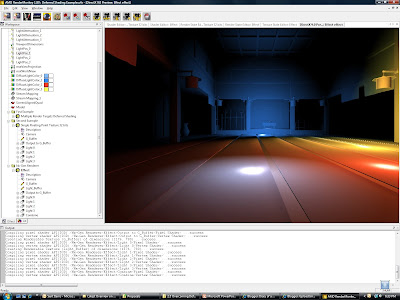
I have a small example program that compares this approach to a deferred renderer but I have not compared it to Damian's approach. I believe his approach might be more flexible regarding a material system than mine but the Light Pre-Pass renderer does not need to do the indexing. It should even run on a seven year old ATI RADEON 8500 because you only have to do a Z pre-pass and store the normals upfront.
The following screenshot shows four point-lights. There is no restriction in the number of light sources:
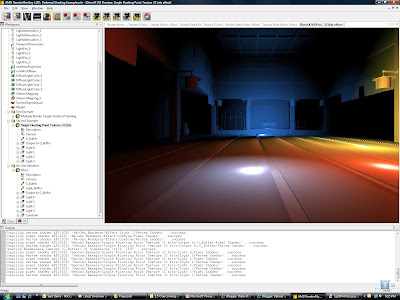
 The following screenshots shows the same scene running with a deferred renderer. There should not be any visual differences to the Light Pre-Pass Renderer:
The design here is very flexible and scalable. So I expect people to start from here and end up with quite different results. One of the challenges with this approach is to setup a good material system. You can store different values in the light buffer or use the values above and construct interesting materials. For example a per-object specular highlight would be done by taking the value stored in the alpha channel and apply a power function to it or you store the power value in a different channel.
Obviously my intial approach is only scratching the surface of the possibilities.
P.S: to implement a material system for this you can do two things: you can handle it like in a deferred renderer by storing a material id with the normal map ... maybe in the alpha channel, or you can reconstruct the diffuse and specular term in the forward rendering pass. The only thing you have to store to do this is N.L * Att in a separate channel. This way you can get back R.V^n by using the specular channel and dividing it by N.L * Att. So what you do is:
(R.V^n * N.L * Att) / (N.L * Att)
Those are actually values that represent all light sources.
Here is a link to the slides of my UCSD Renderer Design presentation. They provide more detail.
The idea is to fill up a Z buffer first and also store normals in a render target. This is like a G-Buffer with normals and Z values ... so compared to a deferred renderer there is no diffuse color, specular color, material index or position data stored in this stage.
Next the light buffer is filled up with light properties. So the idea is to differ between light and material properties. If you look at a simplified light equation for one point light it looks like this:
Color = Ambient + Shadow * Att * (N.L * DiffColor * DiffIntensity * LightColor + R.V^n * SpecColor * SpecIntensity * LightColor)
The light properties are:
- N.L
- LightColor
- R.V^n
- Attenuation
So what you can do is instead of rendering a whole lighting equation for each light into a render target, you render into a 8:8:8:8 render target only the light properties. You have four channels so you can render:
LightColor.r * N.L * Att
LightColor.g * N.L * Att
LightColor.b * N.L * Att
R.V^n * N.L * Att
That means in this setup there is no dedicated specular color ... which is on purpose (you can extend it easily).
Here is the source code what I store in the light buffer.
half4 ps_main( PS_INPUT Input ) : COLOR
{
half4 G_Buffer = tex2D( G_Buffer, Input.texCoord );
// Compute pixel position
half Depth = UnpackFloat16( G_Buffer.zw );
float3 PixelPos = normalize(Input.EyeScreenRay.xyz) * Depth;
// Compute normal
half3 Normal;
Normal.xy = G_Buffer.xy*2-1;
Normal.z = -sqrt(1-dot(Normal.xy,Normal.xy));
// Computes light attenuation and direction
float3 LightDir = (Input.LightPos - PixelPos)*InvSqrLightRange;
half Attenuation = saturate(1-dot(LightDir / LightAttenuation_0, LightDir / LightAttenuation_0));
LightDir = normalize(LightDir);
// R.V == Phong
float specular = pow(saturate(dot(reflect(normalize(-float3(0.0, 1.0, 0.0)), Normal), LightDir)), SpecularPower_0);
float NL = dot(LightDir, Normal)*Attenuation;
return float4(DiffuseLightColor_0.x*NL, DiffuseLightColor_0.y*NL, DiffuseLightColor_0.z*NL, specular * NL);
}
After all lights are alpha-blended into the light buffer, you switch to forward rendering and reconstruct the lighting equation. In its simplest form this might look like this
float4 ps_main( PS_INPUT Input ) : COLOR0
{
float4 Light = tex2D( Light_Buffer, Input.texCoord );
float3 NLATTColor = float3(Light.x, Light.y, Light.z);
float3 Lighting = NLATTColor + Light.www;
return float4(Lighting, 1.0f);
}
This is a direct competitor to the light indexed renderer idea described by Damian Trebilco at Paper .
I have a small example program that compares this approach to a deferred renderer but I have not compared it to Damian's approach. I believe his approach might be more flexible regarding a material system than mine but the Light Pre-Pass renderer does not need to do the indexing. It should even run on a seven year old ATI RADEON 8500 because you only have to do a Z pre-pass and store the normals upfront.
The following screenshot shows four point-lights. There is no restriction in the number of light sources:
 The following screenshots shows the same scene running with a deferred renderer. There should not be any visual differences to the Light Pre-Pass Renderer:
The design here is very flexible and scalable. So I expect people to start from here and end up with quite different results. One of the challenges with this approach is to setup a good material system. You can store different values in the light buffer or use the values above and construct interesting materials. For example a per-object specular highlight would be done by taking the value stored in the alpha channel and apply a power function to it or you store the power value in a different channel.
Obviously my intial approach is only scratching the surface of the possibilities.
P.S: to implement a material system for this you can do two things: you can handle it like in a deferred renderer by storing a material id with the normal map ... maybe in the alpha channel, or you can reconstruct the diffuse and specular term in the forward rendering pass. The only thing you have to store to do this is N.L * Att in a separate channel. This way you can get back R.V^n by using the specular channel and dividing it by N.L * Att. So what you do is:
(R.V^n * N.L * Att) / (N.L * Att)
Those are actually values that represent all light sources.
Here is a link to the slides of my UCSD Renderer Design presentation. They provide more detail.
Friday, March 7, 2008
iPhone SDK so far
Just setup a dev environment this morning with the iPhone SDK ... overall it is quite disappointing for games :-). OpenGL ES is not supported in the emulator but you can't run apps on the iPhone without OS 2.0 ... and this is not realeased so far. In other words, they have OpenGL ES examples but you can't run them anywhere. I hope I get access to the 2.0 file system somehow. Other than this I have now the old and the new SDK setup on one machine and it works nicely.
Now I have to wait until I get access to the iPhone OS 2.0 ... what a pain.
Now I have to wait until I get access to the iPhone OS 2.0 ... what a pain.
Sunday, March 2, 2008
Predicting the Future in Game Graphics
So I was thinking about the next 1 - 2 years of graphics programming in the game industry on the XBOX 360 and the PS3. I think we can see a few very strong trends that will sustain over the next few years.
HDR
Rendering with high-dynamic range is realized in two areas: in the renderer and in the source data == textures of objects
On current high-end platforms people run the lighting in the renderer in gamma 1.0 and they are using the 10:10:10:2 format whereever available or a 8:8:8:8 render target format that uses a non-standard color format that supports a larger range of values (> 1) and more deltas. Typically these are the LogLuv or L16uv color formats.
There are big developements for the source art. id Software published an article on a 8-bit per pixel color format -stored in a DXT5 format- that has a much better quality than the DXT1 format with 4-bit per pixel that we usually use. Before that there were numerous attempts by using scale and bias values in the hacked DXT header to use the available deltas in the texture better for -e.g.- rather dark textures. One of the challenges here was to make all this work with gamma 1.0.
On GDC 2007 I suggested during Chas. Boyds DirectX Future talk to extend DX to support a HDR format with 8-bit that also supports gamma 1.0 better. It would be great if they could come up with a better compression scheme than DXT in the future but until then we will try to make combinations of DXT1 + L16 or DXT5 hacks scenarios work :-) or utilize id Software's solution.
Normal Map Data
Some of the most expensive data is normal map data. So far we are "mis-using" the DXT formats to compress vector data. If you generally store height data this opens up more options. Many future techniques like Parallax mapping or any "normal map blending" require height map data. So this is some area of practical interest :-) ... check out the normal vector talk of the GDC 2008 tutorial day I organized at http://www.coretechniques.info/.
Lighting Models
Everyone is trying to find lighting models that allow to mimic a wider range of materials. The Strauss lighting model seems to be popular and some people come up with their own lighting models.
Renderer Design
To render opaque objects there are currently two renderer designs on the end of the spectrum. The so called deferred renderer and the so called forward renderer. The idea of the deferred renderer design came up to allow a higher number of lights. The advantage of a higher number of lights has to be bought by having lower quality settings in other areas.
So people now start to research new renderer designs that have the advantages of both designs but none of the disadvantages. There is a Light indexed renderer and I am working on a Light pre-pass renderer. New renderer designs will allow more light sources ... but what is a light source without shadow? ...
Shadows
Lots of progress was made with shadows. Cascaded Shadow maps are now the favorite way to split up shadow data along the view frustum. Nevertheless there are more ways to distribute the shadow resolution. This is an interesting area of research.
The other big area is using probability functions to replace the binary depth comparison. Then the next big thing will be soft shadows that become softer when the distance between the occluder and the receiver becomes bigger.
Global Illumination
This is the area with the biggest growth potential currently in games :-) Like screen-space ambient occlusion that is super popular now because of Crysis, screen-space irradiance will offer lots of research opportunities.
To target more advanced hardware, Carsten Dachsbacher approach in ShaderX5 looks to me like a great starting point.
HDR
Rendering with high-dynamic range is realized in two areas: in the renderer and in the source data == textures of objects
On current high-end platforms people run the lighting in the renderer in gamma 1.0 and they are using the 10:10:10:2 format whereever available or a 8:8:8:8 render target format that uses a non-standard color format that supports a larger range of values (> 1) and more deltas. Typically these are the LogLuv or L16uv color formats.
There are big developements for the source art. id Software published an article on a 8-bit per pixel color format -stored in a DXT5 format- that has a much better quality than the DXT1 format with 4-bit per pixel that we usually use. Before that there were numerous attempts by using scale and bias values in the hacked DXT header to use the available deltas in the texture better for -e.g.- rather dark textures. One of the challenges here was to make all this work with gamma 1.0.
On GDC 2007 I suggested during Chas. Boyds DirectX Future talk to extend DX to support a HDR format with 8-bit that also supports gamma 1.0 better. It would be great if they could come up with a better compression scheme than DXT in the future but until then we will try to make combinations of DXT1 + L16 or DXT5 hacks scenarios work :-) or utilize id Software's solution.
Normal Map Data
Some of the most expensive data is normal map data. So far we are "mis-using" the DXT formats to compress vector data. If you generally store height data this opens up more options. Many future techniques like Parallax mapping or any "normal map blending" require height map data. So this is some area of practical interest :-) ... check out the normal vector talk of the GDC 2008 tutorial day I organized at http://www.coretechniques.info/.
Lighting Models
Everyone is trying to find lighting models that allow to mimic a wider range of materials. The Strauss lighting model seems to be popular and some people come up with their own lighting models.
Renderer Design
To render opaque objects there are currently two renderer designs on the end of the spectrum. The so called deferred renderer and the so called forward renderer. The idea of the deferred renderer design came up to allow a higher number of lights. The advantage of a higher number of lights has to be bought by having lower quality settings in other areas.
So people now start to research new renderer designs that have the advantages of both designs but none of the disadvantages. There is a Light indexed renderer and I am working on a Light pre-pass renderer. New renderer designs will allow more light sources ... but what is a light source without shadow? ...
Shadows
Lots of progress was made with shadows. Cascaded Shadow maps are now the favorite way to split up shadow data along the view frustum. Nevertheless there are more ways to distribute the shadow resolution. This is an interesting area of research.
The other big area is using probability functions to replace the binary depth comparison. Then the next big thing will be soft shadows that become softer when the distance between the occluder and the receiver becomes bigger.
Global Illumination
This is the area with the biggest growth potential currently in games :-) Like screen-space ambient occlusion that is super popular now because of Crysis, screen-space irradiance will offer lots of research opportunities.
To target more advanced hardware, Carsten Dachsbacher approach in ShaderX5 looks to me like a great starting point.
Wednesday, February 13, 2008
Android
Just read the FAQ for Android. Here is the most important part:
-----------------
Can I write code for Android using C/C++?
No. Android applications are written using the Java programming language.
-----------------
So no easy game ports for this platform. Additionally the language will eat up so many cycles that good looking 3D game do not make much sense. No business case for games then ... maybe they will start thinking about it :-) ... using Java also looks quite unprofessional to me but I heard other phone companies are doing this as well to protect their margin and keep control over the device.
-----------------
Can I write code for Android using C/C++?
No. Android applications are written using the Java programming language.
-----------------
So no easy game ports for this platform. Additionally the language will eat up so many cycles that good looking 3D game do not make much sense. No business case for games then ... maybe they will start thinking about it :-) ... using Java also looks quite unprofessional to me but I heard other phone companies are doing this as well to protect their margin and keep control over the device.
Friday, January 18, 2008
gDEbugger for OpenGL ES
So I decided to test the gDEbugger from graphicREMEDY for OpenGL ES. I got an error message indicating a second hand exception and there was not much I can do about it. I posted my problem in their online forum, but did not get any response so far.
I guess with the decreasing market of OpenGL there is not much money in providing a debugger for this API. In games, less companies do PC games anymore and OpenGL is not used by any AAA title anymore on the main PC platform Windows.
I was hoping that they target the upcoming OpenGL ES market, but this might be still in its infanty. If anyone knows a tool to debug OpenGL ES similar to PIX or GcmReplay, I would appreciate a hint. To debug I would work on the PC platform ... in other words I have a PC and an iPhone version of the game :-)
Update January 19th: graphicRemedy actually came back to me and asked me to send in source code ... very nice.
I guess with the decreasing market of OpenGL there is not much money in providing a debugger for this API. In games, less companies do PC games anymore and OpenGL is not used by any AAA title anymore on the main PC platform Windows.
I was hoping that they target the upcoming OpenGL ES market, but this might be still in its infanty. If anyone knows a tool to debug OpenGL ES similar to PIX or GcmReplay, I would appreciate a hint. To debug I would work on the PC platform ... in other words I have a PC and an iPhone version of the game :-)
Update January 19th: graphicRemedy actually came back to me and asked me to send in source code ... very nice.
Tuesday, January 8, 2008
San Angeles Observation on the iPhone
I ported the San Angeles Observation demo from Jetro Lauha to the iPhone (www.oolongengine.com). You can find the original version here
http://iki.fi/jetro/
This demo throws about 60k polys onto the iPhone and runs quite slow :-(. I will double check with Apple that this is not due to a lame OpenGL ES implementation on the phone.
I am thinking about porting other stuff now over to the phone or working on getting a more mature feature set for the engine ... porting is nearly more fun, because you can show a result afterwards :-) ... let's see.
http://iki.fi/jetro/
This demo throws about 60k polys onto the iPhone and runs quite slow :-(. I will double check with Apple that this is not due to a lame OpenGL ES implementation on the phone.
I am thinking about porting other stuff now over to the phone or working on getting a more mature feature set for the engine ... porting is nearly more fun, because you can show a result afterwards :-) ... let's see.
Sunday, December 30, 2007
Oolong Engine
I renamed my iPhone / iPod touch engine to Oolong Engine and moved it to a new home. Its URL is now
www.oolongengine.com
I will add now a 3rd person camera model. This camera will be driven by the accelerometer and the touch screen.
www.oolongengine.com
I will add now a 3rd person camera model. This camera will be driven by the accelerometer and the touch screen.
Wednesday, December 26, 2007
Animating Normal (Maps)
There seems to be an on-going confusion on how to animate normal maps. The best answer to this is: you don't :-).
The obvious problem is to stream in two normal maps and then to modulate two normals. If you are on a console platform you just don't want to do this. So what would be a good way to animate a normal? You modulate height fields. Where both height fields have peaks, the result should also have a peak. Where one of the height fields is zero, the result should be also be zero, independent of the other height field.
Usually, a normal map is formed by computing a relief of a height field (bump map) over a flat surface. If is the bump map’s height at the texture coordinates, the standard definition of the normal map is
The obvious problem is to stream in two normal maps and then to modulate two normals. If you are on a console platform you just don't want to do this. So what would be a good way to animate a normal? You modulate height fields. Where both height fields have peaks, the result should also have a peak. Where one of the height fields is zero, the result should be also be zero, independent of the other height field.
Usually, a normal map is formed by computing a relief of a height field (bump map) over a flat surface. If is the bump map’s height at the texture coordinates, the standard definition of the normal map is

The height fields are multiplied to form a combined height field like this

To determine the normal vector of this height field according to the first Equation, one needs the partial derivatives of this functions. This is a simple application of the product rule:

And similarly for the partial derivative with respect to v. Thus:
BTW: to recover the height field’s partial derivatives from the normal map we can use:
About Raytracing
My friend Dean Calver published an article about raytracing that is full of wisdom. The title says it all Real-Time Ray Tracing: Holy Grail or Fool's Errand?. This is straight to the point :-)
LogLuv HDR implementation in Heavenly Sword
Heavenly Sword stores HDR data in 8:8:8:8 render targets. I talked to Marco about this before and saw a nice description in Christer Ericson's blog here
I came up with a similar idea that should be faster and bit more hardware friendly with a new compression format that I call L16uv. The name more or less says it all :-)
I came up with a similar idea that should be faster and bit more hardware friendly with a new compression format that I call L16uv. The name more or less says it all :-)
Normal Map Data II
Here is one interesting normal data idea I missed. It is taken from Christer Ericson in his blog:
One clever thing they do (as mentioned on these two slides) is to encode their normal maps so that you can feed either a DXT1 or DXT5 encoded normal map to a shader, and the shader doesn’t have to know. This is neat because it cuts down on shader permutations for very little shader cost. Their trick is for DXT1 to encode X in R and Y in G, with alpha set to 1. For DXT5 they encode X in alpha, Y in G, and set R to 1. Then in the shader, regardless of texture encoding format, they reconstruct the normal as X = R * alpha, Y = G, Z = Sqrt(1 - X^2 - Y^2).
A DXT5-encoded normal map has much better quality than a DXT1-encoded one, because the alpha component of DXT5 is 8 bits whereas the red component of DXT1 is just 5 bits, but more so because the alpha component of a DXT5 texture is compressed independently from the RGB components (the three of which are compressed dependently for both DXT1 and DXT5) so with DXT5 we avoid co-compression artifacts. Of course, the cost is that the DXT5 texture takes twice the memory of a DXT1 texture (plus, on the PS3, DXT1 has some other benefits over DXT5 that I don’t think I can talk about).
Tuesday, December 25, 2007
Normal Data
Normal data is one of the more expensive assets of games. Creating normal data in Z Brush or mudbox can easily make up for a few million dollars.
Storing normal data in textures in a way that preserves the original data with the lowest error level is an art form that needs special attention.
I am now aware of three ways to destroy normal data by storing it in a texture:
1. Store the normal in a DXT1 compressed texture
2. Store the normal in a DXT5 compressed texture by storing the x value in alpha and the y value in the green channel .... and by storing some other color data in the red and blue channel.
3. Store the normal in its original form -as a height map- in one color channel of a DXT1 compressed texture with two other color channels.
They all have a common denominator: the DXT format was created to compress color data so that the resulting color is still perceived as similar. Perceiving 16 vectors as similar follows different rules than perceiving 16 colors as similar. Therefore the best -so far- solutions to store normals is to
- not compress them at all
- store y in the green channel of a DXT5 compressed texture and red in the alpha channel and color the two empty channels black
- use the DXN format that consists of two DXT5 compressed alpha channels
- store a height map in an alpha channel of a DXT5 compressed texture and generate the normal out of the height map.
The DXT5 solutions and the DXN solution occupy 8-bit per normal. The height map solution occupies 4-bit per normal. It is probably not as good looking as the 8-bit per normal solutions.
There are lots of interesting areas regarding normals other than how they are stored. There are challenges when you want to scale, add, modulate, deform, blend or filter them. Then there is also anti-aliasing ... :-) ... food for thought.
Storing normal data in textures in a way that preserves the original data with the lowest error level is an art form that needs special attention.
I am now aware of three ways to destroy normal data by storing it in a texture:
1. Store the normal in a DXT1 compressed texture
2. Store the normal in a DXT5 compressed texture by storing the x value in alpha and the y value in the green channel .... and by storing some other color data in the red and blue channel.
3. Store the normal in its original form -as a height map- in one color channel of a DXT1 compressed texture with two other color channels.
They all have a common denominator: the DXT format was created to compress color data so that the resulting color is still perceived as similar. Perceiving 16 vectors as similar follows different rules than perceiving 16 colors as similar. Therefore the best -so far- solutions to store normals is to
- not compress them at all
- store y in the green channel of a DXT5 compressed texture and red in the alpha channel and color the two empty channels black
- use the DXN format that consists of two DXT5 compressed alpha channels
- store a height map in an alpha channel of a DXT5 compressed texture and generate the normal out of the height map.
The DXT5 solutions and the DXN solution occupy 8-bit per normal. The height map solution occupies 4-bit per normal. It is probably not as good looking as the 8-bit per normal solutions.
There are lots of interesting areas regarding normals other than how they are stored. There are challenges when you want to scale, add, modulate, deform, blend or filter them. Then there is also anti-aliasing ... :-) ... food for thought.
Wednesday, December 19, 2007
Renderer Design
Renderer design is an interesting area. I recommend starting with the lighting equation, splitting it up in a material and light part and then move on from there. You can then think about what data you need to do a huge number of direct lights and shadows (shadows are harder than lights) and how you do all the global illumination part. Especially the integration of global illumination and many lights should get you thinking for a while.
Here is an example:
1. render shadow data from the cascaded shadow maps into a shadow collector that collects indoor, outdoor, cloud shadow data
2. render at the same time world-space normals in the other three channels of the render target
3. render all lights into a light buffer (only the light source properties not the material properties)
4. render all colors and the material properties into a render target while applying all the lights from the light buffer (here you stitch together the Blinn-Phong lighting model or whatever you use)
5. do global illumination with the normal map
6. do PostFX
Here is an example:
1. render shadow data from the cascaded shadow maps into a shadow collector that collects indoor, outdoor, cloud shadow data
2. render at the same time world-space normals in the other three channels of the render target
3. render all lights into a light buffer (only the light source properties not the material properties)
4. render all colors and the material properties into a render target while applying all the lights from the light buffer (here you stitch together the Blinn-Phong lighting model or whatever you use)
5. do global illumination with the normal map
6. do PostFX
Tuesday, December 18, 2007
How to design a Material System
Here is my take on how a good meta-material / material systems should be written and how the art workflow works:
I just came across the latest screenshots of Mass Effect that will ship soon:
http://masseffect.bioware.com/gallery/
The thing I found remarkable is the material / meta-material system. Skin looks like skin and then cloth has a completely different look and leather looks really like leather. Combined with great normal maps Mass Effects looks like the game with the best looking characters up-to-date.
The best way to a material / meta-material system is very close to what was done in Table-Tennis. I described the system in ShaderX4 some time before I joined Rockstar.
The idea is to dedicate to each material a specific *.fx file and also name the file accordingly. So you end up with eye.fx, skin.fx, metal.fx, brushed_metal.fx, leather.fx, water.fx etc. ... so you will want to end up with probably 15 - 20 *.fx files (they would holds different techniques for shadowed / unshadowed etc.). This low number of files makes shader switching a non-issue and also allows to sort objects according to their shaders, if this is a bottleneck.
The *.fx files can be called meta-material (this naming convention was inspired by a similar system that was used in the Medal of Honor Games, as long as they were based on the Quake 3 engine).
The material files hold the data while each of the meta-material files only hold code. So we differ between code (*.fx file) and data (*.mtl or something different). One of the things that can be done to reduce the data updates is to shadow the constant data and only update the data that changes. In pseudo-code this would be:
- draw eyes from first character in the game
- apply the eye.fx file
- load the data for this file from the material file
- draw the eyes from the second character in the game
- eye.fx is still applied, so we do not have to do it again ... shader code just stays in the Graphics card and does not need to be reloaded
- load the data file for this pair of eyes and load only data into the graphics card that has changed by comparing the shadowed copy of the data from the previous draw call with the one that needs to be loaded now
- move on like this for all eyes
- then move on with hair ...
The underlying idea of the data shadowing and the sorting by shaders is, to reduce the amount of changes that need to be done if you want to apply very detailed and very different surfaces to a character. In other words if you setup a game with such a meta-material / material system there is a high chance that you can find a performance difference between sorting for shaders or sorting for any other criteria.
For me the key elements of having a truly next-gen looking shader architecture for a next-gen game are:
- having a low number of *.fx files to reduce shader switching + good sorting of objects to reduce shader switching
- letting the artist apply those *.fx files and change the settings, switching on and off features etc.
- tailoring the low number of shaders very much to specific materials, so that they look very good (the opposite approach was taken in DOOM III were everything consists of metal and plastic and therefore the same lighting/shader model is applied to everything)
The low number of *.fx files and the intelligence we put into the creation of the effect files should give us a well performing and good looking game and we are able to control this process and predict performance.
I just came across the latest screenshots of Mass Effect that will ship soon:
http://masseffect.bioware.com/gallery/
The thing I found remarkable is the material / meta-material system. Skin looks like skin and then cloth has a completely different look and leather looks really like leather. Combined with great normal maps Mass Effects looks like the game with the best looking characters up-to-date.
The best way to a material / meta-material system is very close to what was done in Table-Tennis. I described the system in ShaderX4 some time before I joined Rockstar.
The idea is to dedicate to each material a specific *.fx file and also name the file accordingly. So you end up with eye.fx, skin.fx, metal.fx, brushed_metal.fx, leather.fx, water.fx etc. ... so you will want to end up with probably 15 - 20 *.fx files (they would holds different techniques for shadowed / unshadowed etc.). This low number of files makes shader switching a non-issue and also allows to sort objects according to their shaders, if this is a bottleneck.
The *.fx files can be called meta-material (this naming convention was inspired by a similar system that was used in the Medal of Honor Games, as long as they were based on the Quake 3 engine).
The material files hold the data while each of the meta-material files only hold code. So we differ between code (*.fx file) and data (*.mtl or something different). One of the things that can be done to reduce the data updates is to shadow the constant data and only update the data that changes. In pseudo-code this would be:
- draw eyes from first character in the game
- apply the eye.fx file
- load the data for this file from the material file
- draw the eyes from the second character in the game
- eye.fx is still applied, so we do not have to do it again ... shader code just stays in the Graphics card and does not need to be reloaded
- load the data file for this pair of eyes and load only data into the graphics card that has changed by comparing the shadowed copy of the data from the previous draw call with the one that needs to be loaded now
- move on like this for all eyes
- then move on with hair ...
The underlying idea of the data shadowing and the sorting by shaders is, to reduce the amount of changes that need to be done if you want to apply very detailed and very different surfaces to a character. In other words if you setup a game with such a meta-material / material system there is a high chance that you can find a performance difference between sorting for shaders or sorting for any other criteria.
For me the key elements of having a truly next-gen looking shader architecture for a next-gen game are:
- having a low number of *.fx files to reduce shader switching + good sorting of objects to reduce shader switching
- letting the artist apply those *.fx files and change the settings, switching on and off features etc.
- tailoring the low number of shaders very much to specific materials, so that they look very good (the opposite approach was taken in DOOM III were everything consists of metal and plastic and therefore the same lighting/shader model is applied to everything)
The low number of *.fx files and the intelligence we put into the creation of the effect files should give us a well performing and good looking game and we are able to control this process and predict performance.
Sunday, December 9, 2007
Porting an Open-Source Engine to the iPhone?
Evaluated several open source engines:
- Ogre: the architecture and design is not very performance friendly. The usage of C++ makes the usage and re-design here quite difficult. An example: each material has its own C++ file and there is an inheritance chain from a base class ...
- Irrlicht: the Mac OS X version I tried looks like a Quake 3 engine. It also seems to lack lots of design elements of a modern 3D engine. Other than this it looks quite good for a portable device. You might also use the original Quake 3 engine then ...
- Quake 3: this is obviously a very efficient game engine with rock-solid tools, I worked with this engine in the Medal of Honor series before, but I wanted a bit more flexibility and I wanted to target more advanced hardware.
- Crystal Space: why is everything a plug-in? Can't get my head around this.
- C4: this is one of my favourite engines, but it is closed source :-(
Thursday, December 6, 2007
iPhone Graphics Programming
I am lately into iPhone graphics programming. The interesting part is that the iPhone uses a PowerVR chip similar to the Dreamcast. Most of the user interface elements want to be addressed via Objective-C but then you can go with C/C++ from there. So my small little engine runs C++ with a nice memory manager and a logging system.
Subscribe to:
Posts (Atom)